
LiveLessons: Power Excel 2003 with MrExcel
April 2008

LiveLessons Power Excel 2003 DVD-ROM with Bill Jelen from QUE
- 7 Hours
- Publisher: QUE Publishing
- ISBN: 978-0-7897-3824-0
Do you wish you could attend Bill Jelenís Power Excel Seminar but you canít find your city on the list of upcoming seminars?
Did you attend the Power Excel seminar and wish you could replay that tip on copying subtotals again?
Can you not make it away from the office for four hours of training?
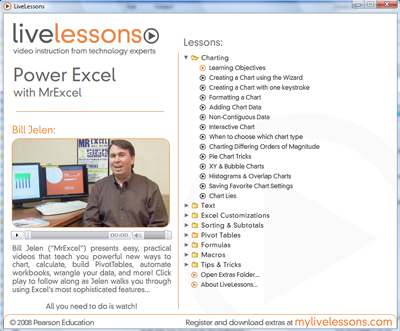
If so, this AMAZING DVD-ROM from QUE is for you. The LiveLessons Power Excel 2003 DVD-ROM contains nearly 7 hours of tips and tricks from Bill's Power Excel seminar. The seminar is broken up into 85 lessons, so you can jump right to a lesson and watch it. In most cases, you will learn the technique and be back to work in less than five minutes.
The package contains a DVD-ROM with 6 hours and 50 minutes of video content. It contains a 100-page booklet with notes from each lesson. There is a completely searchable index on the DVD. Pop this on your computer and you will be understanding pivot tables in just a few minutes.
-
Part 1: Charting
- Lesson 1 Creating a Chart Using the Wizard
- Lesson 2 Creating a Chart with One Keystroke
- Lesson 3 Formatting a Chart
- Lesson 4 Adding Chart Data
- Lesson 5 Noncontiguous Data
- Lesson 6 Interactive Chart
- Lesson 7 When to Choose Which Chart Type
- Lesson 8 Charting Differing Orders of Magnitude
- Lesson 9 Pie Chart Tricks
- Lesson 10 XY & Bubble Charts
- Lesson 11 Histograms & Overlap Charts
- Lesson 12 Saving Favorite Chart Settings
- Lesson 13 Chart Lies
-
Part 2: Text
- Lesson 14 Drag the Fill Handle to Extend a Series
- Lesson 15 Create Your Own Series
- Lesson 16 Joining Text
- Lesson 17 Rapid Formula Copy
- Lesson 18 Convert to Proper Case
- Lesson 19 Joining Dates
- Lesson 20 Converting Formulas to Values
- Lesson 21 Breaking Apart Text
- Lesson 22 Parsing Fixed Width
-
Part 3: Excel Customizations
- Lesson 23 Full Menus
- Lesson 24 Toolbar Customization
- Lesson 25 Resetting Toolbars
- Lesson 26 Steve-O Toolbar
- Lesson 27 Close All Workbooks
- Lesson 28 Recently Used File List
- Lesson 29 Data Entry Tricks
- Lesson 30 Customize All Future Workbooks
- Lesson 31 Copy Worksheets
- Lesson 32 Change All Worksheets
- Lesson 33 Arranging Windows
-
Part 4: Sorting & Subtotals
- Lesson 34 Data Preparation
- Lesson 35 Sorting Basics
- Lesson 36 Random Sort
- Lesson 37 Sorting by Weekday
- Lesson 38 Rearranging Columns
- Lesson 39 Subtotals
- Lesson 40 Collapsing Subtotals
- Lesson 41 Copy Subtotals
- Lesson 42 Formatting Subtotals
- Lesson 43 Multiple Subtotals
- Lesson 44 Filling in Data on Subtotal Rows
- Lesson 45 Subtotal Tricks
-
Part 5: Pivot Tables
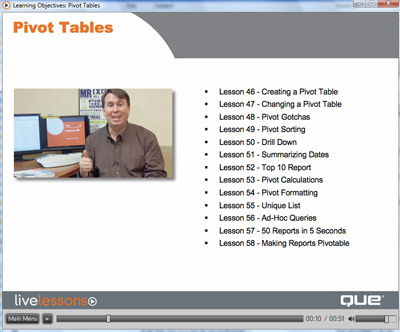
- Lesson 46 Creating a Pivot Table
- Lesson 47 Changing a Pivot Table
- Lesson 48 Pivot Gotchas
- Lesson 49 Pivot Sorting
- Lesson 50 Drill Down
- Lesson 51 Summarizing Dates
- Lesson 52 Top 10 Report
- Lesson 53 Pivot Calculations
- Lesson 54 Pivot Formatting
- Lesson 55 Unique List
- Lesson 56 Ad-Hoc Queries
- Lesson 57 50 Reports in 5 Seconds
- Lesson 58 Making Reports Pivotable
-
Part 6: Formulas
- Lesson 59 AutoSum Tricks
- Lesson 60 Formula Auditing
- Lesson 61 Three Ways of Entering Formulas
- Lesson 62 Relative Versus Absolute Formulas
- Lesson 63 Discovering Functions
- Lesson 64 Goal Seek
- Lesson 65 Unusual Functions
- Lesson 66 IF Formulas
- Lesson 67 VLOOKUP
- Lesson 68 Super Formulas
- Lesson 69 Date & Time
-
Part 7: Macros
- Lesson 70 Recording a Macro
- Lesson 71 Recording Navigation
- Lesson 72 How Many Rows?
- Lesson 73 Event Macros
-
Part 8: Tips & Tricks
- Lesson 74 Finding Records
- Lesson 75 Web Queries
- Lesson 76 Copying Column Widths
- Lesson 77 Floating Palettes
- Lesson 78 Page Numbering
- Lesson 79 Turn Data
- Lesson 80 & in Header
- Lesson 81 Choose from a List
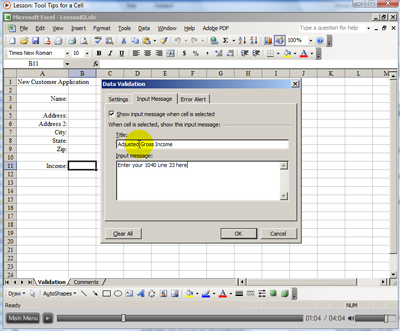
- Lesson 82 Tool Tips for a Cell
- Lesson 83 Word Processing in Excel
- Lesson 84 Mapping Data
- Lesson 85 Have a Talk with Excel


